CDO is workforce software that judges the workday while it happens instead of recording it for later. Every clock event is GPS-verified and evaluated against the labor rules of the state it happened in, at the moment it happens. When a meal window is about to close, the crew is alerted on the roof — not in next week's report. When a rule is broken anyway, the premium is computed, held for a person's decision before payroll, and written to an immutable bilingual record the same day.
CDO uses leading AI models from providers such as Google, Anthropic and OpenAI, chosen per task. The AI proposes; a person approves before anything is written to your records. Roughly 1,500 clock events a week flow through the 65-person pilot crew CDO is running beside its current system, and CDO surfaces the ones that need human judgment. Pricing is $29–49 per user per month with every AI feature on every plan, published openly; legacy field-service platforms publish no pricing at all.
1 — It judges the day. Everyone else records it.
This is the architectural difference everything else follows from, so it's worth being precise about what it means.
In a recording system, the timeclock is a logger. It writes down when people punched, and the compliance question — was this day legal? — gets asked later, by a person, against an export. In practice "later" means at payroll close, or at an audit, or when a demand letter arrives. By then the day is unchangeable and the only remaining question is what it costs.
In CDO, the timeclock is an evaluator. Each punch is scored against the rule set for the state and the worker's schedule as it lands. That single change moves the intervention point from weeks after the fact to minutes before it.
Nothing happens.
The fifth hour closes. The event is logged correctly and completely. Nobody is looking at it, because nobody watches 300 punches a day in real time.
- Tue, payroll close — a clerk spots it in an export, or doesn't
- Premium — added by hand, if someone remembers the rule
- Record — accurate, and now evidence against you
The foreman's phone buzzes.
The rule engine flagged the window at minute 271 of a five-hour clock. The crew still has 29 minutes to take a compliant break.
- 11:31 AM — crew alerted in their own language
- If it slips — premium computed at the regular rate, held for a person's decision
- Record — immutable, bilingual, written automatically
2 — 1,500 clock events a week become a short queue.
A 65-person crew generates about 300 clock events a day — punches, breaks, geofence crossings, job switches, drive segments. Nobody reviews that honestly. So in a recording system, nobody reviews it at all, and exceptions quietly accumulate inside the exact records a plaintiff's attorney will one day subpoena.
CDO reads all of it and does the triage a full-time analyst would do if you could afford one:
Everything is captured
~1,500 events a week: punches, GPS pings, break starts and stops, job changes, drive time.
AutomaticRules score every one
Deterministic evaluators — not a model — flag the twelve exception types against the correct state's law.
DeterministicAI adds the context
The AI explains what happened, why it matters, what it costs, and what it recommends doing.
ExplainedA human decides
The office approves, edits, or rejects. Approval writes the premium into payroll and the record to the audit log.
Human approvalThat funnel is the whole distance between "we have the data" and "we're on top of it." Every system on the market has the data. The question no vendor answers on their pricing page is who is going to read it.
One pricing note that matters more than it sounds: the AI is included in every plan. CDO uses leading AI models from providers such as Google, Anthropic and OpenAI, chosen per task. The AI proposes; a person approves before anything is written to your records. The 65-person crew and the 12-person crew get the same engine.
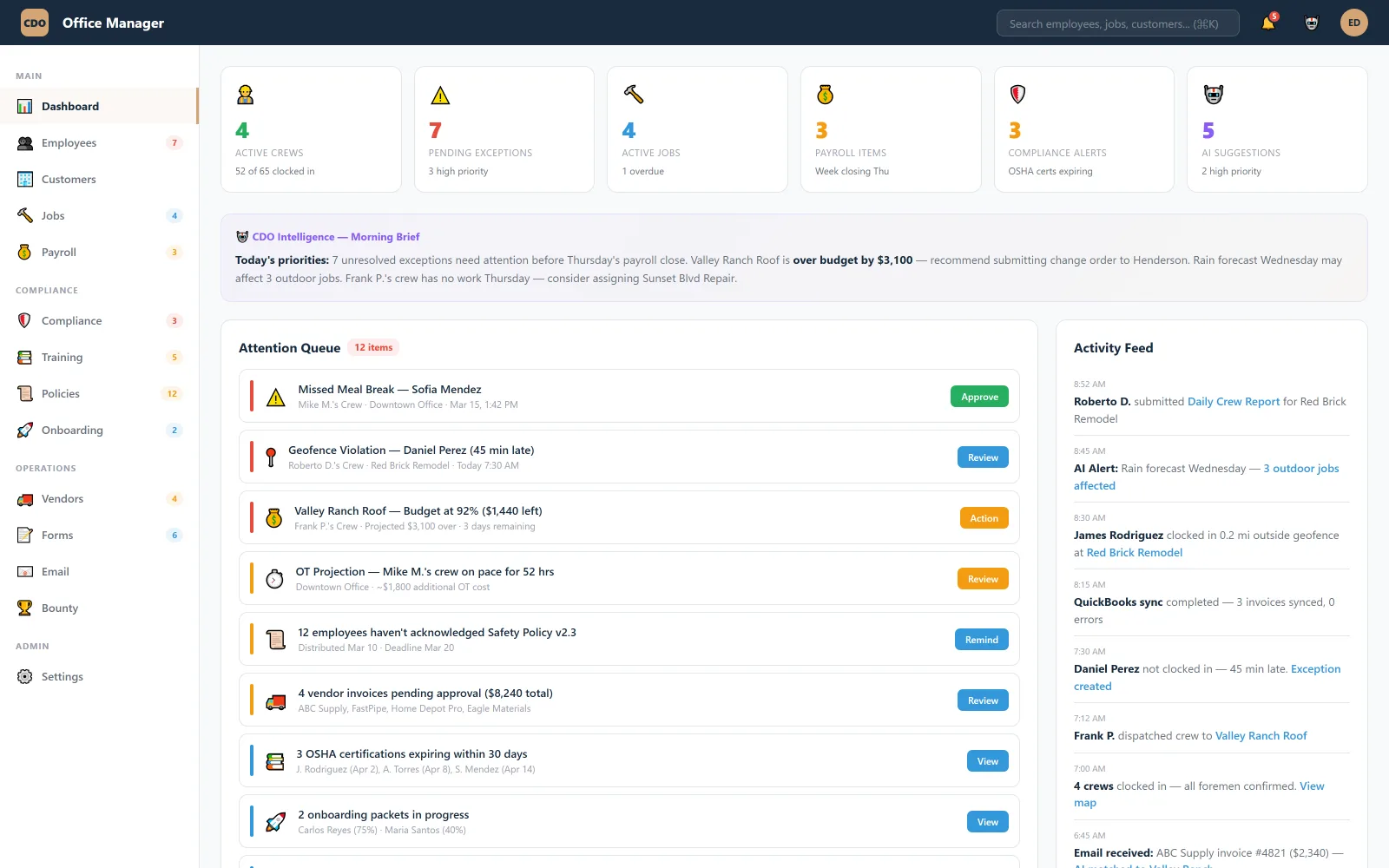
3 — Compliance is the engine, not a report tab.
Most platforms bolt compliance on: you configure a rule, it produces a report, and the report is only as good as whoever reads it. CDO was built the other way around. The wage-and-hour engine is the timeclock — you cannot turn it off, and there is no code path where a punch is stored without being evaluated.
It was built to California first, on purpose. California is the strictest wage-and-hour regime in the country: daily overtime after 8 and double time after 12, meal periods before the end of the fifth hour, one-hour premiums at the regular rate rather than base rate, paid rest and heat-recovery periods, and a private right of action that turns paperwork errors into class claims. A system that survives California handles Texas trivially. The reverse is not true — which is why so many national platforms have a "California mode" that is really just a warning banner.
Here is what the engine actually evaluates on every shift:
| What it checks | Trigger | What CDO does |
|---|---|---|
| Missed meal period | No 30-min break before end of hour 5 | Alerts at minute 271; premium held for a decision if it lapses |
| Short meal period | Break under 30 minutes | Flags — a 29-minute lunch owes the same hour as none |
| Late / interrupted meal | Break started after the window, or broken up | Flags with the timeline attached |
| Second meal period | Shift passes 10 hours without a second break | Warns; tracks the conditional waiver if one is on file |
| Missed rest breaks | No paid 10-min per 4 hours worked | Flags — rest premiums stack separately from meals |
| Daily overtime & double time | Past 8h, past 12h, 7th consecutive day | Computes at the state's rule, not the federal one |
| Regular-rate errors | Bonus or premium paid at base rate | Recomputes — Ferra makes this a common, expensive mistake |
| Geofence anomalies | Punch outside the job-site fence | Flags with distance and map, before it becomes a pattern |
| Drive-time exposure | Compulsory travel between sites or from a yard | Captures it as hours worked |
| Heat-recovery periods | Outdoor work above the state's threshold | Prompts and logs the cool-down as taken |
| Rounding drift | Any rounding near a meal boundary | Refuses it — pay to the minute, device timestamp authoritative |
| Missing attestation | Shift ends without the worker's confirmation | Prompts in the worker's language and stores the signed record |
Rule set applied per state — see labor rules by state for what changes across Texas, Florida, Arizona, Nevada, Colorado, Washington, Oregon, and New York.
4 — The AI never acts alone.
Every AI feature in CDO is built on one invariant: the AI proposes, a human approves, and only then does anything get written. This is not a setting. It's the architecture — AI actions become proposals in a queue, an authorized human approves or rejects them, and approval writes both the change and an immutable audit-log row recording who decided what, when, and on what evidence. Anything approved can be reverted to its exact prior state.
This matters commercially, not just philosophically. Wage-and-hour exposure is decided on records. A system where software silently adjusted time entries produces records that are worth less than useless in a dispute — you've handed the other side a story about a black box editing timecards. A system where every adjustment carries a named human approver and a before-image produces the opposite: a clean, defensible chain of custody.
It also sets a hard limit we don't cross: CDO computes, proposes, and records the decision — it does not move money. Payroll fires from your payroll provider; QuickBooks stays your ledger. CDO is the decision and audit layer, deliberately not the transaction layer.
5 — Spanish is stored, not translated.
Nearly every competitor offers Spanish as an interface language: the buttons change, the data doesn't. CDO treats language as part of the record. Every prompt, break attestation, exception explanation, safety acknowledgment, and policy document exists in English and Spanish, auto-detected per worker — and both versions are kept for the legal retention period.
The distinction only sounds academic until someone contests a document. If a worker signed a meal-period waiver, the question in front of a hearing officer is whether they understood it. A translated interface produces an English record of a Spanish moment, and you are left arguing about what was on the screen. Stored bilingual records produce the Spanish document the worker actually read, timestamped, with the English alongside it. One of those is an argument; the other is an exhibit.
6 — Published pricing, with the AI included.
CDO is $29 per user per month for 1–10 people, $39 for 11–40 and $49 for 41 or more, every AI feature on every plan, no setup fees. The comparison that matters isn't the sticker — it's what a comparable capability set costs once you've assembled it.
| For a 20-person crew | CDO | Legacy field-service platforms |
|---|---|---|
| Monthly software | $780$39 per user for 11–40 people ($29 for 1–10, $49 for 41+) | Quote onlyServiceTitan and BuildOps list “request a quote” |
| AI review of clock events | Included, every plan | Ask the vendor |
| Setup and implementation | No setup fees | Ask the vendor |
| Time clock, compliance and safety | One system | Ask which are included |
Three cost lines that don't appear on anyone's pricing page but land on your invoice anyway: implementation fees (ask any legacy vendor for theirs; CDO has none), the second and third app you buy because the first one doesn't do compliance or safety, and the office hours someone spends reconciling exports between them. CDO's pitch on price isn't that it's cheap software. It's that it's one system.
The proof, not the pitch
Every claim above is checkable, and here is the specific evidence behind them:
- A real crew, in a pilot. A 65-person roofing crew in Southern California is piloting CDO beside its current time and payroll system, which remains its system of record for now. The 1,500-events-a-week figure is that crew's real volume, not a projection.
- History import is how that customer was onboarded. Its Housecall Pro customers, jobs and invoice history were imported at onboarding and carried forward as the reporting baseline, so nothing started from zero.
- The guarantee is in writing. First-month guarantee: if CDO isn't useful in your first month, tell us within 30 days of your first invoice and we refund that month. See the terms.
- The compliance content is public. The resource library — meal-break law, overtime law, penalty calculators, state-by-state rules — is free and unsalable. It's the same rule set the product enforces, written out so you can check our work.
Where CDO is the wrong answer
Three situations where you should buy something else, stated plainly because you'll find out anyway:
- You're a two-to-five person shop that mainly needs to get paid. Your bottleneck is invoicing and booking, not wage-and-hour exposure. Housecall Pro and its peers are genuinely good at that, and cheaper for your size.
- You want a consumer-facing booking marketplace. CDO doesn't do lead generation, online booking widgets, or review-solicitation marketing, and it isn't on the roadmap. That's a different product category.
- You need a deep trade-specific estimating catalog — aerial measurement, supplement automation, insurance-claim workflows. Roofing-specific tools go deeper there. CDO covers estimating and invoicing well, but the workforce and the law are what it's built for.
If your crews are big enough that timecards are a risk surface, and you operate anywhere with daily overtime or mandatory breaks, that's when the trade goes the other way.