It's like having a labor attorney on every timecard — watching the job site live.
CDO is real-time labor-compliance software for field crews. It verifies every clock-in by GPS, times every break to the minute, and flags the problem while it is still happening — while the crew is on the roof, not after the demand letter.
CDO Intelligence: 7 unresolved exceptions before Thursday's payroll close — triaged by what costs you money first.
The case is never about the day you got it wrong. It's about the two hundred you can't prove you got right.
A wage-and-hour claim is won or lost on documentation, and the days that sink a company are the ordinary ones nobody wrote down. This is what CDO files at the end of every shift — each line written by the device that recorded it.
What the devices recorded
- 06:58:41Clock inGPS ±13 ft — inside the geofence
- 07:14:02On siteArrival logged, drive time captured
- 11:52:10Meal start4h 53m into the shift
- 12:23:44Meal end31 minutes 34 seconds
- 15:22:06Clock outGPS on site — matches the schedule
What it answers
- §512(a)First meal before the fifth hour
- Yes — at 4h 53m
- §512(a)A full thirty minutes, uninterrupted
- Yes — 31m 34s
- §226.7Premium pay owed
- None
- §510Daily overtime
- None — 7.87 h worked
- —Rounding applied
- None. Paid to the minute.
- UETAAttested in the worker's language
- Signed — EN / ES
Not one line of this was typed by hand. Every entry was written by the device that recorded it, and every later correction is itself a dated, signed entry. Ask for the demo and we will run it against a week of your own jobs.
1,500 clock events a week. Six need a human.
A 65-person crew generates 300+ clock events per day — clock-in, lunch-out, lunch-in, clock-out. No office can review that honestly. So nobody does — until the lawsuit. CDO reviews all of it and brings your team the exceptions, with context and a recommended action.
Weekly clock events reviewed by CDO — not by your office
Exceptions surfaced for human judgment — with context and a recommended action
California meal-break premium owed per missed break, per workday, per employee
Do the math the way a plaintiff's attorney would: one missed meal break = one hour of premium pay. Two a day across a 65-person crew compounds into six figures a year — before penalties. CDO catches them while the crew is still on the roof.
Run your own math
Move the sliders to match your operation. The estimate is deliberately conservative — it excludes PAGA penalties, waiting-time exposure, and attorney fees.
Assumes $32/hr average loaded wage · one missed meal = one hour of premium pay (CA §512) · CDO at $29/user/mo. Full calculator with the 3-year lookback →
Most systems record the day. CDO judges it as it happens.
The moment a worker taps clock-in, CDO is already asking the questions a wage-and-hour attorney would ask — and answering them with GPS, the geofence, and the device clock. Every shift becomes a clean, to-the-minute, defensible record. No reconstructing it later. No guessing.
Six capabilities. One platform.
Start with what you need — add the rest as your operation grows. Every capability is bilingual, built on Claude, and designed for construction from the ground up — not adapted to it.
Timecards
GPS on 4 events · zero rounding · pay-to-the-minuteA timestamp tells you when. CDO logs when and where — GPS on every clock-in, clock-out, lunch start and break return, with no rounding, ever. Then it reads the pattern, so the exceptions come to you instead of waiting to be found. You see them. Your crew doesn't know you're watching.
Workforce
AI-moderated messages · <200msPutting a name on a job is not dispatch. CDO holds the whole picture — conflicts caught days before a crew is ever sent, foreman-to-crew history kept, every message screened for professionalism in under 200 ms and logged. Who showed up, who switched sites, who keeps finishing first.
Field Intel
Live fleet map · shift trails · drive timeYour other tools tell you somebody was at the site. CDO tells you where exactly, at what time, how long the drive took, and whether that route has been getting longer. Live fleet map, shift trails, geofenced punches — and the patterns that surface before you think to look.
Forms & Docs
Gate-locked to clock-in · UETA/ESIGN · 45-min onboardingYour crew is still getting paper at the tailgate and chasing signature links the rest of the week. CDO ties the pre-shift form to the clock-in itself. Incident reports filed the moment they happen; pay stubs, W-2s and verification letters on demand, no HR ticket. A new hire onboards on a phone in 45 minutes.
Safety & Training
25+ CA topics · audit-readySafety software nobody opens protects nobody. CDO puts training in the flow your crew already uses every morning — 25+ California OSHA topics, tailgate sign-offs, e-signatures and expiry alerts on the clock-in screen. If a citation lands, the trail is already built.
Scorecard
Per-job · per-crew · legal in CAGut feel promotes the wrong man and raises everyone at once. CDO measures instead — output per hour, on-time rate and exceptions, per crew and per person, every week. Pay your best people more, legally in California — on audited scorecards that satisfy the piecework exemption.
Your pace, your call
Start with Timecards + Field Intel. Add Workforce, Forms & Docs, Safety, and Scorecard when the operation calls for it. Same platform, same engine — your CDO just takes on more.
Clock in. The paperwork happens by itself.
One tap on a hot phone with gloves on. GPS confirms the job site, the meal-break clock starts counting, and the time card writes itself — to the minute, in the worker's language.
Built for gloves and sun
56dp touch targets, high-contrast dark theme. Designed for a roofer at noon — not a desk.
GPS does the paperwork
Geofence verification confirms every punch happened at the right job site. Off-site patterns surface automatically.
Pay to the minute
Device timestamp is authoritative. No rounding, no shaving — the math a wage-and-hour audit wants to see.
Spanish is not a setting
Every prompt, break attestation, and exception flow ships in English and Spanish. Pick once; CDO remembers.
One shift. Zero paperwork.
Clock-in verified
GPS + geofence confirm the crew is inside the boundary. No signed form, no punch.
Incident filed from the tailgate
Photo, GPS pin, and signature — attached to the shift record, not a paper trail.
§512 watch, quietly
CDO reminds the foreman the meal is due by 11:58. Break logged on time — premium avoided.
Clock-out + signature
The timecard is attested on the phone, in English or Spanish. The day closes clean.
Payroll drafts itself
Hours, premiums, and exceptions pre-filled with context. A human approves — done.
Real screens. Real workflows.
No abstract illustrations. This is what your office manager and your superintendent actually see.
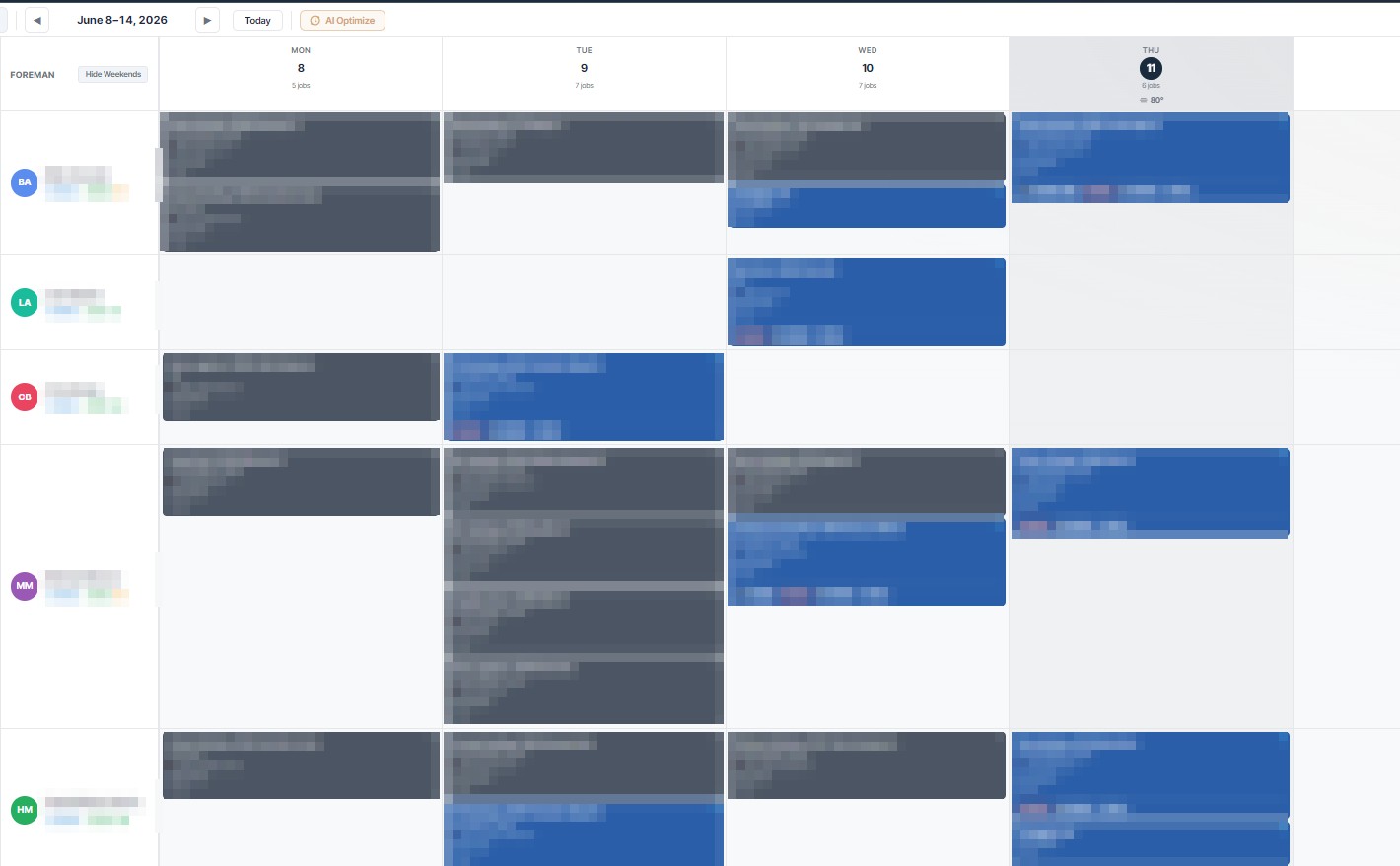
The week at a glance. Every foreman, every crew, every job — drag work onto a row and the crew is dispatched. One click on AI Optimize and CDO proposes the schedule for you.
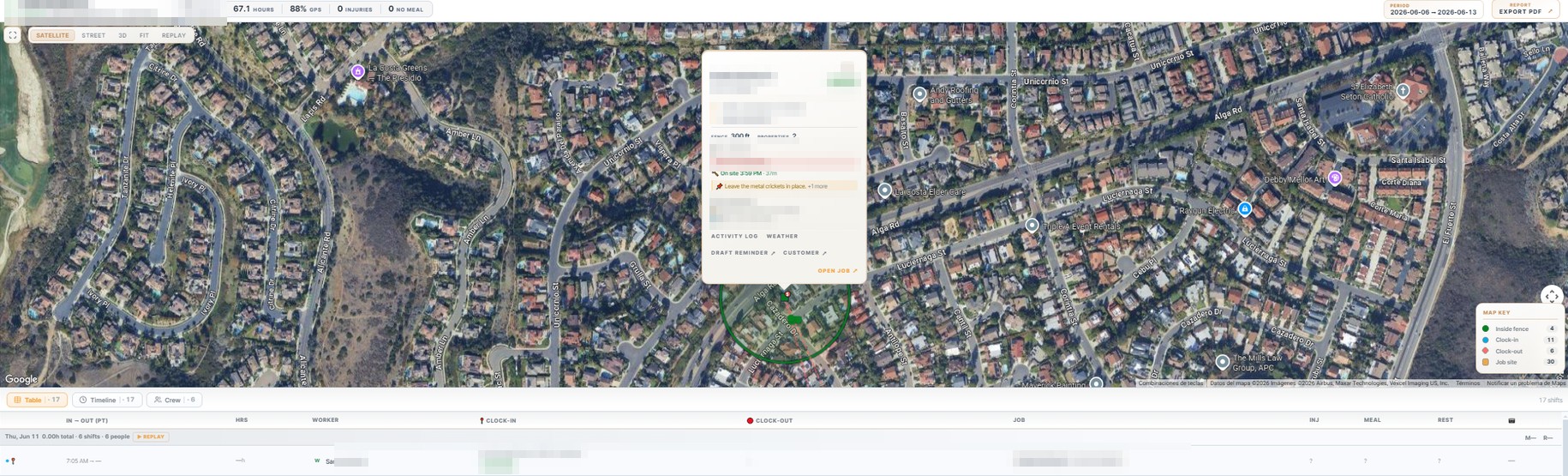
Every crew, live on satellite. Geofenced job sites, GPS-verified clock-ins and outs, on-site time per worker — the map and the time records on one screen.
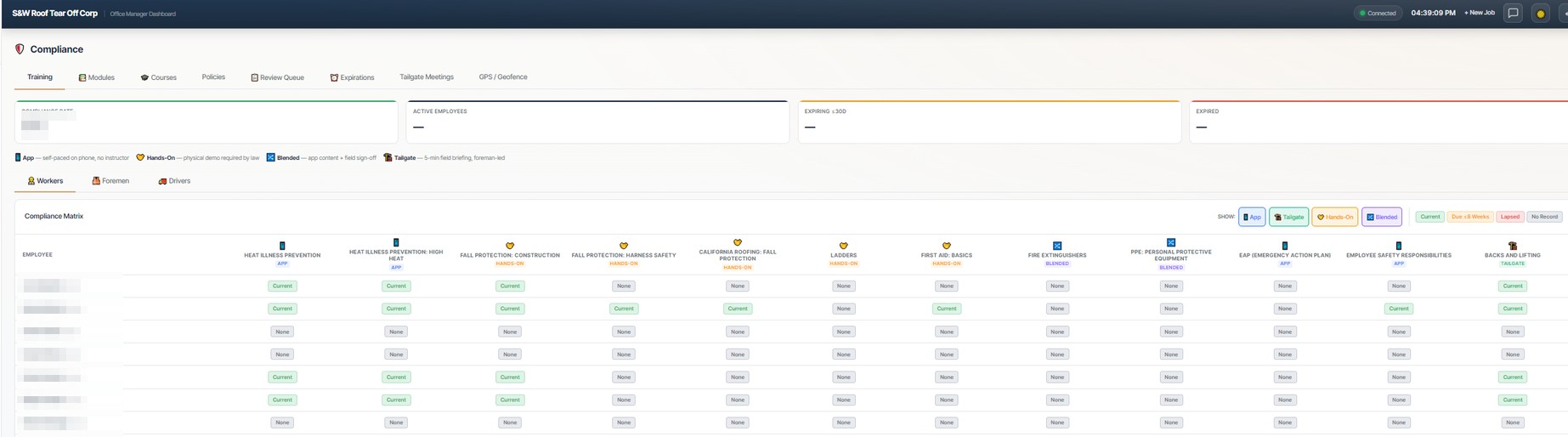
The compliance matrix. Every worker against every required certification — heat illness, fall protection, first aid — current, due, or expired at a glance. Cal/OSHA-ready without the binder.
Today's priorities: 7 unresolved exceptions before Thursday's payroll close. Valley Ranch Roof is over budget by $3,100 — recommend submitting a change order. Rain forecast Wednesday may affect 3 outdoor jobs.
The attention queue. CDO triages the morning for your office manager: missed breaks, geofence violations, pending invoices — sorted by what costs you money first.
Thursday's tear-off,
confirmed on Monday.
CDO iMessages your contractors and your homeowners from a real iPhone at your office — auto-drafted from the job record, approved by a human, and filed where it belongs. No apps. No portals. Blue bubbles.
The confirmation
Monday, 10:00 AM — three days outOn the left, the iPhone on your desk. On the right, the Mac running your CDO CRM. Watch one Thursday tear-off get confirmed — three days out.
Full Tear-Off — 2168 Canyon Drive
Thursday · 6:30 AM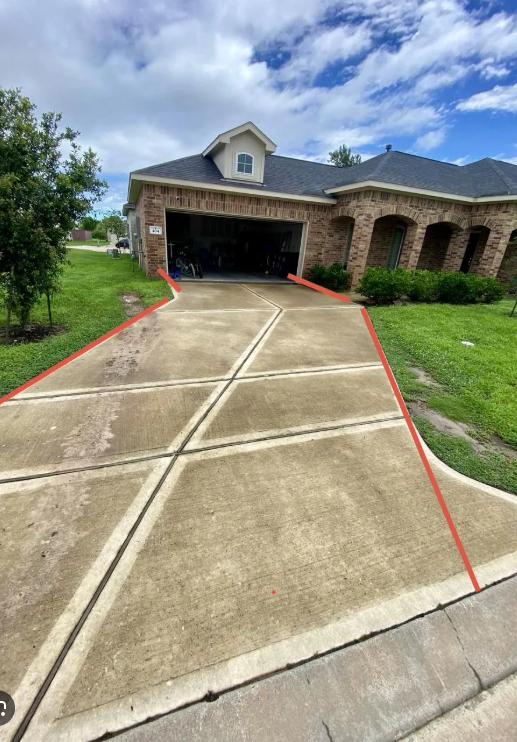 Amanda · Reply + 1 photo — filed to job ✓
"Be careful with this one — inspect the driveway BEFORE you drive on it, and take note of the grass damage on the left so it's documented. I don't want it to crack and us get blamed."
Three audiences
The same job record, three different textsThe contractor gets logistics. The homeowner gets an introduction. The foreman gets the note — inside the CDO app. All three drafted from the same job record.

The callback
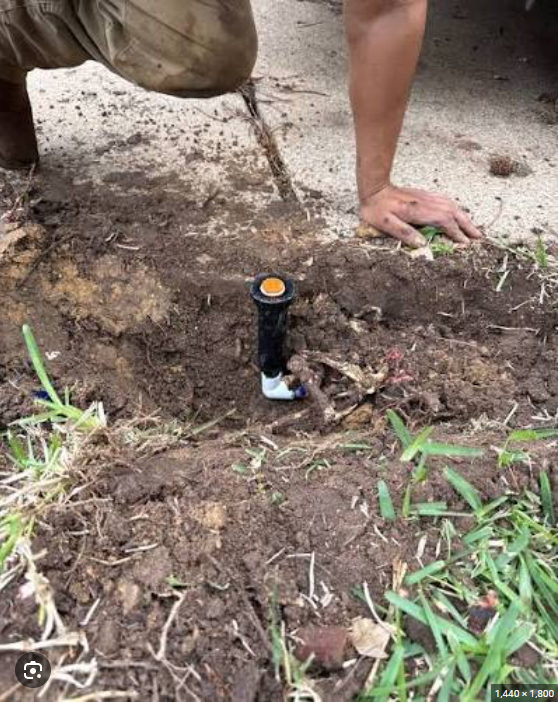
Saturday, 9:12 AM — two days after the jobThe homeowner texts a photo like any other message. The office turns it into a task in the CDO app. The fix comes back as a photo — on the same job record.
Full Tear-Off — 2168 Canyon Drive
Tear-off complete ✓Amanda · 1 photo · broken sprinklerJeff · fix photo + note — filed to job ✓
"Hey Eddie — I don't know if it was the truck, but this sprinkler head by the driveway is broken. Should I send this to the roofing company, or to you?"
It reads the whole day. You sign off on six lines.
One assistant for the whole company. The roofer, the foreman, HR, and the owner all talk to the same brain — and it answers each of them in their role, in their language. When money moves, it drafts; a human approves.
Drafts the paperwork, never signs it
Jobs, invoices, schedules, premium pay — the assistant proposes a complete draft with prices resolved and flags raised. Nothing is written until a human taps Approve.
A morning brief, not a dashboard
Every day at 5 AM the owner gets the day in plain language: who's where, what's flagged, what's owed — by email, text, or voice.
Every action audited
Each proposal, approval, and undo lands in an immutable audit log. The AI is an advisor with a paper trail — not an actor.
AI proposes. A human approves. Every time. That's the architecture, not a promise.
Built for the most aggressive wage-and-hour state in the country.
Meal-break law, drive-time exposure, prevailing wage, the conditional-waiver trap — CDO doesn't just track them. It catches violations in real time, drafts the resolution, and lays down the audit trail.
Meal-break math, automated§512
First meal before hour five. Second before hour ten. Conditional waivers tracked, voided when the day crosses 12 hours, and premium pay pre-filled into payroll.
Drive-time exposure, handled
Truck-start, on-site arrival, on-site departure, and home arrival treated as distinct events under Morillion v. Royal Packing.
Prevailing wage, tagged
Job-level prevailing-wage rates enforced at the punch level. Certified-payroll-ready every Friday.
Audit trail, immutable
Every flag, every resolution, every employee acknowledgment — captured, time-stamped, and exportable for PAGA, DLSE, or class-action defense.
Bilingual by default. No setting to toggle.
CDO auto-detects whether each person is speaking, reading, or signing in English or Spanish — and renders both side by side when compliance demands it. Every form, message, and acknowledgment stored in both languages, permanently.
"Heads up — your second meal break is due in 18 minutes. Want me to remind your foreman?"
CDO writes the prompt for the office, captures it for the audit trail, and translates it for the field in real time.
«Atención — su segunda comida vence en 18 minutos. ¿Le aviso a su capataz?»
Translation, dual display, and dual storage handled by the Language Intelligence Layer. No human in the loop.
Try it on this page. The EN / ES toggle in the corner runs the same idea — flip it and every word follows you.
Built on Claude. The same AI the Fortune 500 runs on.
Three Claude models route by role and task — sub-second responses for the field, deep pattern detection for the office, full strategic analysis for the owner. AI proposes; a human always approves.
In the field
Field worker · ForemanClock in and out with one tap, ask a question and get an instant answer in English or Spanish, start and end breaks, file an incident, and message the crew — every message auto-checked for professionalism.
In the office
Office manager · HRTriage the day's exceptions with a recommended action on each, prep payroll, run compliance review, and catch patterns across weeks of timecards before they turn into a problem.
For the owner
Owner · AdminRead a plain-language morning brief by email, text, or voice, track labor-cost trends and vendor spend, and run what-if scenarios across the whole operation.
Powered by Anthropic. As Claude gets smarter, your CDO gets smarter — at no extra cost to you.
A record the company can defend — and the crew can trust.
The same to-the-minute record that shields the company from a six-figure PAGA claim proves to the crew they were paid for every minute worked. One system. Two kinds of protection.
Defensible by design
- An immutable, time-stamped record built for PAGA, DLSE, and class-action defense
- Meal & rest premiums caught the day they happen — before they stack into six figures
- Buddy-punching, off-site, and freeway clock-ins flagged automatically
- Certified-payroll-ready on prevailing-wage jobs
Paid right, every time
- Paid to the minute — no rounding, no shaving, ever
- Every hour they worked is proven, not argued
- Breaks they missed are paid automatically, not "forgotten"
- Their whole time record, in their own language
Put one crew on CDO for a month. If it doesn't catch exposure your current setup is missing — money you're losing, or risk you couldn't see — we refund the month.
Four steps. Your crew learns one of them.
The hard part of compliance is that it asks your office to review a thousand events a week and your crew to remember rules nobody handed them. CDO moves that work to where it belongs: one tap in the field, everything else automatic, and a short list of decisions for a human at the end.
-
The crew
They tap once. That's the whole ask.
Clock in on a phone with gloves on. GPS confirms the job site, the meal clock starts counting, and the time card begins writing itself — in English or Spanish, whichever they read.
-
CDO, continuously
Every event gets judged as it happens.
Inside the geofence or not. Meal started before the fifth hour or not. Overtime crossing a threshold. Each check runs the moment the event lands — not on Friday, when it is already a liability.
-
The office
You see the exceptions, not the noise.
The thousand clean events never reach you. What reaches you is the short list that needs judgment — each one carrying its evidence, the law it touches, and a recommended action.
-
Payday
Payroll drafts itself. You approve it.
Hours to the minute, premiums already priced, exceptions already resolved — pushed to QuickBooks or exported in the format your payroll provider takes. Nothing posts until a person signs off.
Days, not months. No setup fees, no implementation project, no consultant. Your crew onboards from their own phones, and CDO imports the customer and job history you already have — so week one starts with your data in it, not an empty database.
Stop paying for three tools. Start running CDO.
Most field-services companies stitch the workforce together across three platforms — a CRM for jobs, a time-tracking app for the crew, a safety platform for OSHA. Three contracts, three logins, three bills. CDO collapses the workforce side of all three into one.
per technician / month, as commonly reported — before the time-tracking and safety add-ons
per user / month — workforce, compliance, and safety in one bill
Published starting prices for leading field-service platforms, 2026. CDO replaces the workforce stack — your accounting and payroll providers stay.
Replaces the workforce stack. Keeps your accountant.
Hours, breaks, jobs, and exceptions flow from CDO into QuickBooks in both directions — and out to your PEO or payroll provider as a payroll-ready file. No double entry. No re-keying. No surprises on payday.
QuickBooks
Two-way syncCustomers, jobs, employees, time entries, and payroll items flow both directions. QuickBooks Online for Starter and Pro; Desktop via Right Networks for Enterprise. Every sync logged and reversible.
QuickBooks App Store listing for one-click install, plus deeper QB Time integration for customers who want CDO timecards inside QB on day one.
Your PEO or payroll provider
Payroll-ready exportsCDO generates the file your provider accepts — CSV, XLSX, or PDF. Meal-break premiums, overtime, drive-time, and prevailing-wage adjustments pre-calculated and labeled before they leave the system.
Direct API push to the major payroll and PEO platforms — a generic adapter, so every new provider is an implementation, not a rebuild.
GustoQuickBooks PayrollADPPaychex FlexPrism HRisolvedAsureVensure
The back office doesn't switch a thing. CDO sits between the field and your existing financial stack — it doesn't replace it.
$29 to $49 a person. Everything else is included.
Pick the tier by the size of your crew. The intelligence engine is identical in all three — what changes is how much of the operation it runs. No setup fees, no per-clock-event billing, no annual contract.
- CDO Time, Crew, Field
- QuickBooks Online integration
- Email + CDO Help
- Everything in Starter
- + CDO Docs, CDO Score
- QB Online + Desktop
- Email + chat + guided setup
- Everything in Pro
- + CDO Safe, full API, white-label
- QB Desktop (Right Networks)
- Phone + Slack + dedicated rep
Every plan gets the full Claude model family — Haiku, Sonnet and Opus, matched to each task automatically. You never pay for a smaller model.
Try it. If it doesn't catch real exposure in your first month, it's on us.
Straight answers, no sales call required.
The basics
What is CDO?
CDO (Chief Digital Officer) is a real-time labor-compliance platform for field-services companies — roofing, construction, and the trades. Built on Anthropic's Claude, it verifies every clock event, meal break, and job by GPS as it happens and surfaces only the exceptions that need a human decision.
Who is CDO for?
Field-services companies with 10 to 100+ crew members — roofing contractors, construction firms, and skilled trades. Especially California companies that need wage-and-hour compliance handled automatically instead of hopefully.
How is CDO different from ServiceTitan, BuildOps, or a time-tracking app?
Three ways. CDO is real-time — it judges the day while it happens instead of recording it for later. It is compliance-first — California meal-break law, premium pay, and audit trails are the core, not an add-on. And it is one platform — time, crew messaging, safety, HR documents, and scorecards in a single $29–49/user tool instead of three subscriptions. See the Connecteam comparison →
What AI does CDO use?
Anthropic's Claude — the full model family (Haiku, Sonnet, and Opus), matched to each task automatically: instant answers in the field, deeper work on payroll and compliance, owner-level analysis up top. Every plan gets all of them — you never pay for a smaller model. AI proposes; a human always approves before anything is written to your books.
California and the law
How does CDO handle California meal-break compliance?
CDO enforces Labor Code §512 in real time: first meal before hour five, second before hour ten, conditional waivers tracked and voided when a day crosses 12 hours. Missed-break premium pay is calculated and pre-filled into payroll, with an immutable audit trail behind every decision. Read the full meal-break guide →
What is the penalty for a missed meal break in California?
Under California Labor Code §226.7, each workday with a missed, short, or late meal or rest break owes the worker one additional hour of pay at their regular rate. Quiet violations compound fast across a crew — PAGA claims built on them regularly settle in six figures. CDO catches the violation the day it happens, pre-fills the premium into payroll, and keeps the proof. Estimate your exposure →
Is CDO really bilingual?
English and Spanish by default, with no setting to configure. CDO auto-detects each worker's language, renders compliance documents side by side in both, and stores every record bilingually for any future audit.
Does CDO work outside California?
Yes — CDO runs anywhere in the United States. Its compliance engine is built to California's standard, the strictest wage-and-hour regime in the country, and runs each state's actual rules — Nevada's two-tier daily OT, Colorado's COMPS triggers, Washington's fifth-hour meals, New York's spread-of-hours. See your state's rules →
Cost, setup and your existing tools
How much does CDO cost compared to ServiceTitan or BuildOps?
CDO runs $29–49 per user per month with no setup fees, published openly. Legacy field-service platforms don't publish pricing at all — independent analyses commonly report roughly $250–300 per technician per month to start, plus implementation fees, and they still need a separate time-tracking app and safety platform on top.
How long does CDO take to set up?
Days, not months — and no setup fees. Crew members onboard themselves from their phones in about 45 minutes, documents and UETA/ESIGN signatures included, and CDO imports your existing customer and job history so nothing starts from zero.
Does CDO replace QuickBooks?
No — and that's deliberate. CDO syncs with QuickBooks in both directions and exports payroll-ready files to your PEO or payroll provider. It replaces the workforce stack (time tracking, crew app, safety platform), not your accounting. Your bookkeeper stays.
Can my crew clock in from their phones?
Yes — the CDO field app (iOS and Android) clocks crews in with GPS geofence verification at the job site, tracks breaks with bilingual prompts, and works with gloves on: 56dp touch targets and a high-contrast theme built for outdoor sun.
Twenty minutes from now,
you'll know what your exposure is.
We run CDO against a real week on a working crew — GPS-verified clock-ins, breaks to the minute, the exceptions it caught — and then show you what it would have found on your own jobs.
Request your demorun the numbers on your own crew first →
write to us at team@cdohr.ai